Page 1 of 1
hwo? error ... at addres 01B46DC9 in module ‘ig4dev32.dll’
Posted: 07 Mar 2010, 10:04
by fyp2010
Dear:
when I run the example which is presented in the User Tutorial:BCI2000 Tour. some error happened.
After I press the button 'Set Config', the erro happend.
The error below:
Access violation at addres 01B46DC9 in module ‘ig4dev32.dll’. Read of address 00000000.
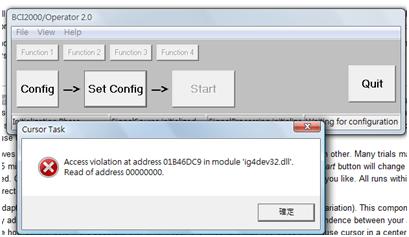
Could anyone help me to solve this problem?
Posted: 08 Mar 2010, 08:04
by jawilson
Hello,
Using Google, this error appears to be caused by outdated Intel graphics drivers. Is this what you are using, or do you have an NVIDIA/ATI graphics card? If you have Intel graphics, update the drivers, which will allow it to support OpenGL. Let us know if this works for you.
Adam
Now I have operated BCI2000 sucessfully
Posted: 08 Mar 2010, 09:30
by fyp2010
Adam:
Thanks for your suggestion.
Now I have tried to operate BCI2000 on the computer in our laboratory, and it is sucessful. I would do the experiment on that computer.
The BCI2000 only can not be operating on my own computer. I think I would update the driver of Graphic card according your suggestion later.
Solve the error due to the graphic driver version
Posted: 10 Mar 2010, 03:46
by fyp2010
Visit the website of Intel
http://www.intel.com/support/detect.htm, go to check automatically the version of Intel Graphic Driver.
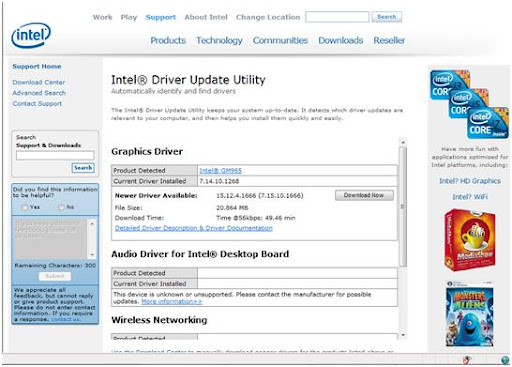
The website of Intel to check version of graphic driver
After completing the checking, the detail for the graphic driver of my own computer will show up, and it will tell me to download the new version of driver.
When the new version driver is installed, the computer is required to restart. After that the BCI2000 software can be able operated on My computer, since the error due to the driver version is solved. The error message “Access violation at addres 01B46DC9 in module ‘ig4dev32.dll’. Read of address 00000000.” does not come up any longer.