Page 1 of 1
Control Signal Isolation?
Posted: 15 Aug 2024, 12:42
by parguello
Hello,
I am using the SMR paradigm to control the 1D translation (x-axis) of an object within Unity, following the SMR tutorial.
I've everything working for the most part, just trying to improve performance at this point.
I am using BCI2000RemoteNETStandard/UnityBCI2000 to interface BCI2000 and Unity.
Essentially, I am using the bci.Control.GetSignal(1,1) command to get the output of my signal processing chain.
I had a few questions:
- It is my understanding that the output of my signal processing chain (Spatial Filter->ARFilter->LinearClassifier->Normalizer) is a control signal set to channel 1 (horiz control). Were I to introduce/config channel 2 in the LinearClassifier, I'd have vert control, and I could use bci.Control.GetSignal(2,1) to enable y-axis control in Unity. Is this understanding correct?
- Is there an easy way to inspect the control signal outside of BCI2000? I'd been using MATLAB to analyze the .dat files of my CursorTask sessions until now, and there doesn't seem to be any state variables or anything that indicate something like a control signal. Is there a way to dump that signal into the .dat files?
Re: Control Signal Isolation?
Posted: 16 Aug 2024, 05:51
by mellinger
It is my understanding that the output of my signal processing chain (Spatial Filter->ARFilter->LinearClassifier->Normalizer) is a control signal set to channel 1 (horiz control). Were I to introduce/config channel 2 in the LinearClassifier, I'd have vert control, and I could use bci.Control.GetSignal(2,1) to enable y-axis control in Unity. Is this understanding correct?
This should be correct, yes. At least that is how it works in the BCI2000 CursorTask application module.
Is there an easy way to inspect the control signal outside of BCI2000? I'd been using MATLAB to analyze the .dat files of my CursorTask sessions until now, and there doesn't seem to be any state variables or anything that indicate something like a control signal. Is there a way to dump that signal into the .dat files?
There are two different ways to achieve this.
* Add a SignalStream<> filter to the filter chain (src/shared/filters/SignalStream.h),
* Write a SignalSharing client to receive the desired signal from BCI2000, and save it in an arbitrary format.
https://www.bci2000.org/mediawiki/index ... nalSharing
I'll be glad to assist you further if you decide for one of these options.
Re: Control Signal Isolation?
Posted: 26 Aug 2024, 12:20
by parguello
I decided to give this option a shot. Per that link you shared, the SignalSharingDemo seems to work just fine.
I'd like to get a Python SignalSharing client up and running, so I'm trying to launching the SignalSharing_PythonDemo from my batch directory.
However, I'm getting this error:
Code: Select all
35: Could not run "SignalSharingDemoSignalProcessing": The system cannot find the file specified (0x02).
Indeed, that file does not exist in the prog folder. Shouldn't this have been built along w/ the SignalSharingDemo during compilation by selecting BUILD_DEMOS?
Re: Control Signal Isolation?
Posted: 26 Aug 2024, 13:08
by mellinger
There was an error in the file, it was referring to an obsolete signal processing module. I fixed it in SVN.
Thanks for notifying!
Re: Control Signal Isolation?
Posted: 28 Aug 2024, 16:37
by parguello
Thank you for the fix; the demo is working in proper order.
What I'm doing is essentially taking the SignalSharingPythonDemo.py script and modding it to output that data to a .csv file.
By default it's listening to localhost:1879, which ShareTransmissionFilter is set to output to.
Is it really as simple as a trivially setting ShareNormalizer to localhost:1879?
Or would I need to modify SignalSharingPythonDemo.py to specify the first channel, etc? That information seems to be encoded in BCI2000 messages as is, and the script as a consequence automatically detects how many channels are present.
Re: Control Signal Isolation?
Posted: 29 Aug 2024, 04:09
by mellinger
Is it really as simple as a trivially setting ShareNormalizer to localhost:1879?
Yes, it is. The script will read number of channels etc from a BCI2000 message, as you say.
Re: Control Signal Isolation?
Posted: 29 Aug 2024, 13:32
by parguello
Happy to report that I am receiving Normalizer's output just fine:
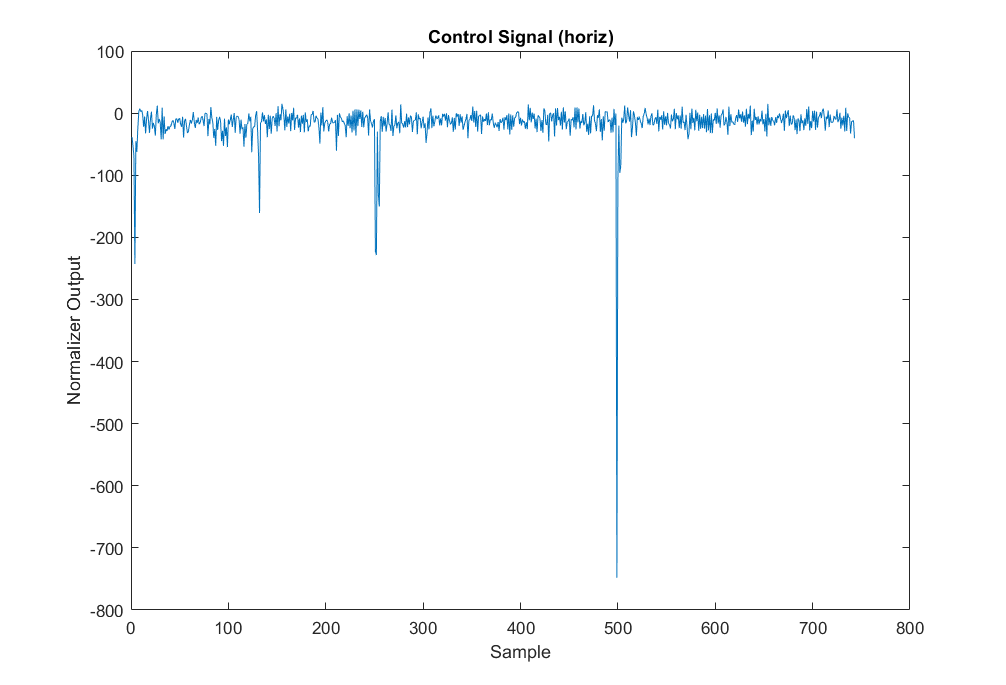
- normalizer_signal.png (32.65 KiB) Viewed 109465 times
I appreciate your help tremendously!
The skew towards nearly exclusively negative values is due to some noise (appears to be slightly <1Hz, not quite sure what it could be) seen on my C3 electrode, which has a weight of -1 in the Linear Classifier. To reduce this, I'm going to try to relocate my setup to a less noisy area. If that does not work, I'm going to reconsider these active electrodes since they were quite bothersome to implement and are not resolving noise issues as effectively as I'd hope. I've a source filter implemented that is bandpassing 1Hz to 40 Hz, notching 60 Hz. I'd welcome any advice in dealing w/ these noise problems!
As for the Normalizer itself, I had a question: documentation reveals that for continuous adaptation, UpdateTrigger should be an empty string. When setting this parameter, do I simply enter ""? Also, would you happen to have any further insight/pointers as to what my Normalizer parameters should be, given that I'm looking for continuous update w/ no trials? Here are the parameters of interest:
Code: Select all
Filtering:Normalizer floatlist NormalizerOffsets= 1 -1 0 % % // normalizer offsets
Filtering:Normalizer floatlist NormalizerGains= 1 1 0 % % // normalizer gain values
Filtering:Normalizer intlist Adaptation= 1 2 0 0 2 // 0: no adaptation, 1: zero mean, 2: zero mean, unit variance (enumeration)
Filtering:Normalizer matrix BufferConditions= 1 1 1 // expressions corresponding to data buffers (columns correspond to output channels, multiple rows correspond to multiple buffers)
Filtering:Normalizer float BufferLength= 60s 9s % % // time window of past data per buffer that enters into statistic
Filtering:Normalizer string UpdateTrigger= "" // expression to trigger offset/gain update when changing from 0 (use empty string for continuous update)
Re: Control Signal Isolation?
Posted: 29 Aug 2024, 13:43
by mellinger
documentation reveals that for continuous adaptation, UpdateTrigger should be an empty string. When setting this parameter, do I simply enter ""?
Typically, you edit parameters in the Operator module's Config dialog, and there you would leave the edit field empty.
If you use a text editor to edit parameter files, you need to enter a single percent sign for the empty string.
Re: Control Signal Isolation?
Posted: 29 Aug 2024, 13:48
by mellinger
Also, would you happen to have any further insight/pointers as to what my Normalizer parameters should be, given that I'm looking for continuous update w/ no trials?
Your parameters look reasonable to me. Note that you will need to design the task such that positive and negative deflections of the signal ampliftude will occur with the same probability, otherwise the normalizer will not work properly if you cannot use per-target buffers.